Video Downloader for Tumblr
- 4.8
- Rating
- 10.00K
- Installs
- Free
- Price

 Analysis by App-foxy
I noticed Video Downloader for Tumblr because it solves a very specific problem: keeping Tumblr videos, GIFs, and photos available outside the feed. After spending time with it, my impression is that its appeal is immediate, but its long-term value depends heavily on how often Tumblr is part of your daily routine. It is not trying to replace a full video editor or become a general media manager. It is a focused saving tool from Angolix, and that narrow purpose is both its biggest strength and its clearest limitation.
The app sits in the video players and editors category, although “downloader” describes the experience more accurately than “editor.” It is free to install, aimed at a Teen audience, and supports devices running Android 7.0 or later. Its current version is 26.1.6, while the app first appeared on December 8, 2020. Those details matter because this is the kind of utility I would expect to keep installed for a long time, not merely try once and delete.
From first-week convenience to lasting usefulness
As the first-week novelty settles, I find the clearest test is whether saving makes a repeated Tumblr habit easier rather than simply enlarging a collection. A useful next step is to notice which moments actually call for a local copy and which are better served by keeping the original post close at hand. That distinction helps show whether the app’s convenience can become a lasting part of your routine.
You May Also Like

 Pandora - Music & Podcasts
Pandora’s Music Is Easy to Start, but Harder to Recover
Pandora’s strength is its low-effort path from a seed to a station. Its weak spot is how much confidence it asks you to place in connection, setup, and quiet recovery.

 AccuWeather: Weather Radar
AccuWeather Review: A Quick, Clear Forecast for Everyday Decisions
For everyday plans, the best forecast is the one you can understand quickly. AccuWeather makes rain timing, radar, and local conditions easy to act on, with a few trade-offs.

 Hill Climb Racing
Why Hill Climb Racing Still Turns Crashes Into One More Run
A tiny car, a bumpy hill and one more upgrade: Hill Climb Racing keeps resurfacing because its simple chaos makes every near-miss feel personal.

 AliExpress - Shopping App
AliExpress Makes Global Shopping Feel Personal, but Shoppers Bear the Risk
AliExpress turns a global marketplace into a pocket-sized discovery engine. Its reach is useful, its shopping loop compelling, and its trade-offs easy to miss.

 Lords Mobile: Kingdom Wars
Lords Mobile Is a Kingdom-Building Routine, Not a Quick Match
A case-by-case verdict on the building, battles, device demands, and social commitments that make Lords Mobile rewarding for some players and exhausting for others.

 PDF Scanner app - TapScanner
TapScanner Makes Paperwork Easier to Capture, Check, and Share
TapScanner makes scanning with a phone feel less like a rescue operation and more like a dependable step in getting work done. Its capture tools are useful, though not flawless.
More From Our News Desk
View All News


Why the first few sessions feel so effective
The first-week appeal is easy to understand. When I find a Tumblr clip I want to watch again, the normal experience is tied to scrolling back through a busy feed, locating the original post, and hoping the content is still accessible in the same form. A dedicated downloader changes that routine into a simple save-and-return habit. Instead of treating Tumblr as the only place where the media exists, I can build a personal offline collection.
The most useful part is the range of media it targets. This is not limited to ordinary video posts. The app is also designed for saving GIFs and photos, and its bulk-saving approach is especially relevant when a blog contains several images worth keeping. That makes it more practical for someone collecting visual references, reaction GIFs, fan art, mood-board material, or clips for personal viewing than an app focused on one file type.
I also like that the product is specific rather than pretending to be an all-purpose social-media toolbox. A general browser download method can be awkward on a phone, and screen recording is a poor substitute when the goal is simply to preserve a post for later. Screen recording captures everything on the display, often includes unwanted interface elements, and creates a new recording rather than saving the source media cleanly. A Tumblr-focused downloader is more direct when Tumblr is the source I use most.
During the first week, the strongest use case is impulse saving. I might come across a short clip while commuting, save it instead of bookmarking the post, and view it later without repeating the search. Someone who follows several active Tumblr blogs can benefit from the same workflow. The app becomes a small inbox for media that deserves attention but does not need to interrupt the moment it is discovered.
Bulk saving changes who benefits most
Bulk saving is more important than it may sound. Saving one item is convenient, but saving several GIFs or photos at once can turn a slow, repetitive task into a quick collection session. I would particularly recommend this app to users who periodically review a tag, blog, or themed feed and want to preserve a group of related images. It is less compelling for someone who downloads only one occasional picture every few weeks.
There is a trade-off here. Bulk tools encourage collecting more than you will actually revisit. The first session can feel productive because the saved folder grows quickly, but a large pile of media becomes harder to organize mentally. I found that the app works best when I save with a purpose: a set of references for a project, a handful of favorite GIFs, or videos I genuinely expect to watch again. Without that discipline, the convenience can create digital clutter.
A practical habit is to use a short selection rule before saving. I ask myself whether I want the actual file or merely want to remember the post. If I only want to find the creator again, a bookmark or Tumblr follow may be better. If I want the image or clip available independently, downloading makes sense. This distinction prevents the app from becoming a dumping ground for every interesting post.
What the app is, and what it is not
It is important to set expectations early. I would not install this expecting trimming, captions, filters, timeline editing, or polished publishing tools. Its place in the video category comes from handling saved media, not from offering a full creative studio. If my goal were to cut a clip, combine several files, add music, or prepare a social post, I would move the downloaded file into a separate editor.
That separation can actually be useful. A focused downloader avoids the distraction of a large editing interface when I only need to preserve something. The downside is that it creates a two-step workflow for anyone who wants to modify the result. Users looking for one app from discovery through editing and sharing may find the experience incomplete.
The app is free, which lowers the barrier to testing it for a real week rather than judging it from a single download. There are optional in-app purchases priced at $1.99 to $2.99 per item. I would approach those purchases cautiously and first decide whether the free experience already fits my routine. A utility like this earns its place through repeated convenience, not through a one-time burst of curiosity.
How it compares with the usual alternatives
The closest alternative is often Tumblr’s own saving or bookmarking behavior. Bookmarks preserve a route back to content, while a downloader preserves a local copy for independent access. Bookmarks are better when I care about the original blog, comments, or context. Local files are better when I want a personal collection that is not dependent on finding the same post again.
Using a mobile browser is another option. A browser can be more flexible for navigating different sites, but that flexibility also makes the process less focused. I may need to deal with several pages, confusing media elements, or a download flow that was not designed for a phone. This app makes more sense when Tumblr is the regular source and speed matters more than broad compatibility.
Screen capture and screen recording remain fallback methods, but they involve compromises in quality and convenience. They are useful when a normal saving route is unavailable, yet they are not what I would choose for building a clean media library. A general file manager can organize what has already been saved, but it does not replace a source-specific discovery and download workflow.
The value after the novelty fades
After the first month, the question changes from “Can this save a post?” to “Do I still use it often enough to justify keeping it installed?” In my view, the answer is yes for three groups: active Tumblr users, people who regularly collect GIFs and images, and anyone who needs a fast way to preserve visual material for later reference. For these users, the recurring value comes from reducing friction every time a worthwhile post appears.
The value is weaker for casual Tumblr visitors. If I open Tumblr only occasionally and rarely keep media, the app may become invisible after the initial experiment. That is not necessarily a flaw; it reflects the narrow job it performs. A specialized utility should be judged by frequency of need rather than by how many unrelated functions it includes.
One realistic monthly workflow would be to review saved Tumblr content at the end of each week, remove files that no longer matter, and keep only the items with a clear purpose. I might retain a small GIF collection for messaging, a folder of images for inspiration, and a few videos for offline viewing. This makes the app part of a repeatable routine instead of a one-time download button.
The rating is a 4.8 average from around 1.6 thousand ratings, and the app has passed 10 thousand installs. I read that as encouraging evidence that the focused idea resonates with its audience, though I would still weigh those figures against my own habits. A highly rated downloader can be excellent for frequent Tumblr users and unnecessary for everyone else.
Maintenance is mostly about the collection
The biggest maintenance burden is not learning the interface. It is managing what I save afterward. Downloaded media can accumulate quietly, especially when bulk saving makes it easy to collect several items in one sitting. If I never review the resulting folders, the app may solve the immediate problem while creating a storage and organization problem later.
I recommend setting a simple cleanup rhythm. Once a month, I would look through the saved media, delete duplicates or forgotten items, and separate useful collections from temporary downloads. This is particularly important for videos, which can consume more storage than a casual user expects. The app’s usefulness improves when the saved library remains selective and easy to browse.
Another maintenance question is whether the app remains compatible with the way Tumblr changes over time. A downloader depends on the source platform’s content structure and on Android’s handling of files. I would keep an eye on whether the current version continues to fit my device and workflow rather than assuming a downloader will remain perfect indefinitely. The fact that Angolix has continued the app through version 26.1.6 is reassuring for ongoing use, but my recommendation is still to test the actual save process after major platform or phone changes.
Because the minimum operating system is Android 7.0, the app is accessible to users with older supported Android devices. That is useful if I am keeping an older phone as a media device or secondary handset. At the same time, people on newer phones may have stronger built-in file organization, so the app’s advantage comes from Tumblr-specific convenience rather than from replacing every part of the phone’s storage system.
Where fatigue can set in
The first source of fatigue is repetition. If I save only one item at a time, the process may eventually feel like an extra step compared with simply enjoying the post in Tumblr. The app earns its place when I repeatedly need the file itself, not merely when I occasionally admire something. Bulk saving helps reduce repetition, but it does not eliminate the need to decide what deserves permanent space.
The second source is separation from context. A saved video or image may lose the creator name, caption, conversation, or original meaning once it sits in a local folder. For personal reference this may be acceptable, but it is a real weakness if attribution or rediscovery matters to me. When context is important, I would save the Tumblr post as well as the media, rather than treating the downloaded file as a complete replacement.
The third is the boundary between saving and editing. I may download a clip intending to reuse it, only to discover that I need another app to crop it, convert it, or prepare it for sharing. That is not a defect if I understand the product’s role, but it can be frustrating if I expected a complete video workstation because of its category placement.
There is also a judgment call around personal use. I would use the app for media I am allowed to keep and would be careful about reposting someone else’s work. Downloading for convenience does not automatically grant permission to redistribute, edit, or claim ownership. Keeping that distinction in mind makes the tool more responsible and avoids turning a personal archive into an uncredited publishing source.
Small habits that make it more useful
My first tip is to save in batches only after filtering. Rather than selecting every attractive image from a page, I would mark the items that serve a specific purpose and then use the bulk workflow for that group. This preserves the time-saving benefit without allowing the collection to grow aimlessly.
My second tip is to separate “watch later” from “keep permanently.” A video I want to view once does not need the same treatment as a reference clip or favorite GIF. If I apply those labels mentally before downloading, I am less likely to fill storage with files that lose their appeal after one viewing.
My third tip is to pair local saving with source tracking when the material matters. For a useful image or a creator I may want to revisit, I would retain enough information to find the original Tumblr post again. The downloader is strongest at preserving the media; Tumblr remains stronger at preserving the social and creative context around it.
My fourth tip is to treat the app as a capture tool rather than a complete archive system. Once the media is saved, I would use the phone’s normal organization features to keep collections manageable. This division of labor is more realistic than expecting a focused downloader to handle discovery, cataloging, editing, and publishing equally well.
Who should install it and who should skip it
I would recommend it to a Tumblr-heavy user who regularly encounters videos, GIFs, or photos worth keeping. It is also a sensible choice for someone who wants a quick collection workflow rather than a broad downloader that tries to support every social platform. The Teen content rating is worth noting for families, especially because the source platform can contain varied material and the app is intended for saving that kind of content.
I would skip it if I rarely use Tumblr, if I only need bookmarks, or if my main goal is video production. A full editor is the better choice for cutting and publishing. A browser or general file workflow may be more suitable for someone who downloads from many unrelated sources. And if I care primarily about creator context, bookmarking the original posts may be more valuable than keeping detached files.
For me, the deciding test is simple: after the first week, do I have a recurring reason to save Tumblr media? If the answer is yes, the app’s focused design remains useful. If the answer is no, its narrow purpose means it will probably become unused background software.
A measured long-term verdict
Video Downloader for Tumblr earns lasting space when it becomes part of a real collecting habit. Its fast saving, support for GIFs and photos, and bulk workflow address a clear need without surrounding that need with unnecessary editing features. The free entry point makes it easy to judge through actual use, while the optional purchases mean I would evaluate the everyday benefit before spending anything.
My final view is positive but deliberately specific. This is not an essential app for every Android owner, and it is not a replacement for Tumblr, a file manager, or a video editor. It is a practical companion for people who repeatedly want local copies of Tumblr media. If I keep my saved folders selective and remember that downloaded files lose their original context, the app continues to provide useful convenience month after month. If I stop collecting from Tumblr, its value fades just as quickly.
My recommendation: install it if Tumblr is a regular source of videos, GIFs, or photos and try it through a complete saving-and-cleanup cycle. That is the fairest way to see whether its speed becomes a lasting habit or merely feels impressive during the first few sessions.
FAQs for Video Downloader for Tumblr
01What is Video Downloader for Tumblr and how does it work?
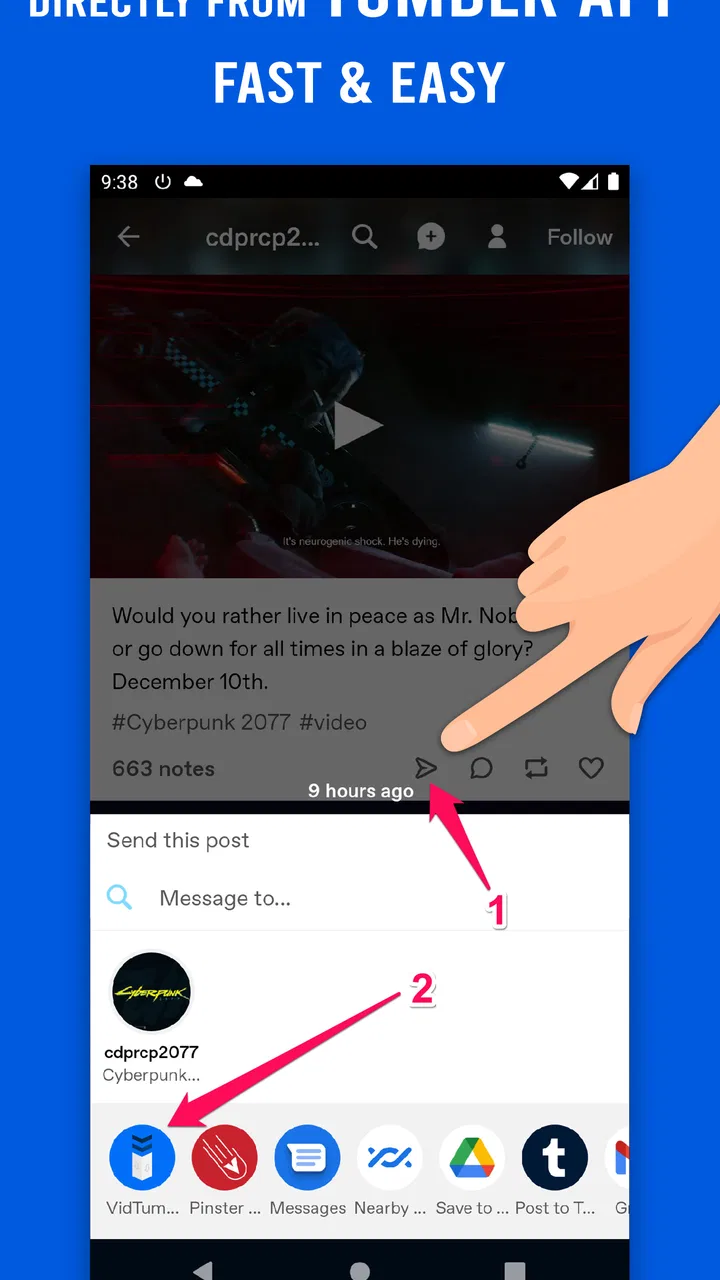
Video Downloader for Tumblr is an app designed to help users save supported videos from Tumblr posts to their Android or iOS device. After copying a Tumblr post link or sharing it with the downloader, the app analyzes the URL and presents available download options. The exact steps and supported formats may vary depending on the app version and the type of Tumblr post.
02Can I download any video from Tumblr with this app?
Not every Tumblr video is guaranteed to download successfully. Public posts with directly accessible media usually work best, while private posts, deleted content, restricted blogs, embedded videos from other platforms, or posts protected by technical limitations may not be supported. Download availability can also change if Tumblr updates its website or media delivery system.
03Where are downloaded Tumblr videos saved on my device?
Downloaded videos are generally saved in the app’s designated download folder or in your device’s gallery, Photos app, or video library, depending on the operating system and the permissions granted. If a video does not appear immediately, check the app’s internal downloads section and your file manager. Some devices may require enabling media or storage access first.
04Is Video Downloader for Tumblr free to use?
Many Tumblr video downloader apps provide basic downloading features at no cost, but the free version may include advertisements, limited download options, or optional in-app purchases. Pricing and available features depend on the specific application and its current listing in the Google Play Store or Apple App Store. Review the permissions, subscriptions, and purchase details before confirming any payment.
05Is it legal and safe to download videos from Tumblr?
Downloading a video for personal offline viewing may be acceptable in some situations, but you should always respect the creator’s copyright, privacy, and usage terms. Do not repost, sell, or distribute downloaded content without permission. For safety, install the app only from an official store, examine its requested permissions, avoid suspicious download links, and remember that the downloader cannot guarantee that every Tumblr post is free to reuse.
Pros
- Downloads Tumblr videos for offline viewing
- Simple interface that is easy to navigate
- Supports saving videos directly to device storage
- Quick access to previously downloaded content
- Useful when traveling or dealing with limited data
Cons
- May not download content from private Tumblr blogs
- Download speed depends on your internet connection
- Ads may interrupt the downloading experience
- Some video formats may not be supported
- Respect copyright and creators’ sharing permissions

Video Downloader for Tumblr
Gallery